Laser rangefinder sensors are critical components in numerous applications, from autonomous vehicles and robotics to industrial automation and surveying. Their ability to provide precise distance measurements through time-of-flight or phase-shift principles makes them indispensable. However, like any sophisticated electronic system, they can encounter issues that require systematic debugging to ensure optimal performance. This guide outlines a practical, step-by-step approach to diagnosing and resolving common problems with laser rangefinder sensors.
The debugging process begins long before power is applied. A thorough visual inspection of the sensor, its mounting, and all connections is essential. Check for any physical damage to the lens or housing, as even a small crack or misalignment can scatter the laser beam and cause inaccurate readings. Ensure the sensor is securely mounted and properly aligned with the target area. Vibration or movement can introduce significant error. Next, verify all electrical connections. Loose cables, corroded connectors, or incorrect wiring to the power supply and host controller (e.g., UART, I2C, PWM interfaces) are frequent culprits behind sensor failure. Confirm that the voltage and current supplied match the sensor's datasheet specifications precisely; both undervoltage and overvoltage can lead to erratic behavior or permanent damage.
Once hardware integrity is confirmed, power on the system and proceed to the initial software communication check. Most modern laser rangefinders communicate via serial protocols. Use a terminal program or dedicated software to attempt to read the sensor's identity or version data. A failure to establish communication typically points to incorrect baud rate settings, protocol mismatches, or faulty wiring. Consult the manufacturer's communication protocol manual to verify command structure and data formatting. If communication is successful but the returned data is nonsensical, check for endianness issues or incorrect parsing of the data packet.
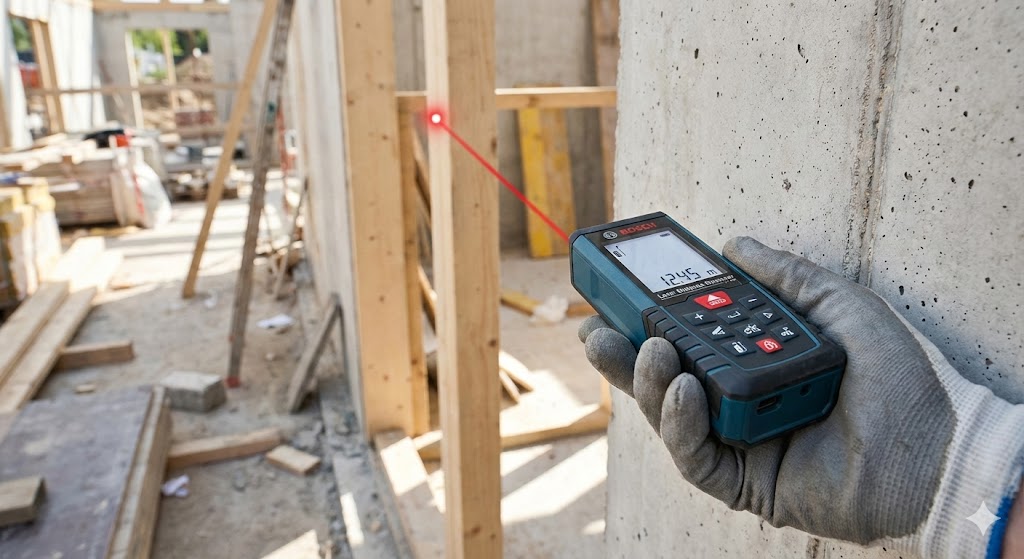
Assuming basic communication is functional, the next phase involves evaluating the quality of the distance measurements. Begin with a controlled environment. Place a standard, high-reflectivity target at a known, fixed distance in a well-lit area free of obstructions. Take a series of measurements and analyze the data. Consistently inaccurate readings (bias error) often indicate a need for calibration. Many sensors have internal calibration routines or require applying a correction factor based on a known distance. Random noise or jitter in the readings suggests electrical interference or power supply instability. Employ shielding for data cables, use ferrite beads, and ensure the power supply is clean and regulated. Proximity to high-power motors, inverters, or other sensors can also induce noise.
Environmental factors are a major source of error for optical sensors. Laser rangefinders can be adversely affected by ambient light, particularly direct sunlight or other strong light sources operating at similar wavelengths. Test the sensor in varying light conditions. If performance degrades in bright light, consider adding a physical sunshade or optical filter. The target's properties are equally important. Low-reflectivity surfaces (like black matte materials), transparent objects (glass), or absorbent materials can return weak or no signals. Some sensors have adjustable laser power or receiver sensitivity settings to compensate for difficult targets, but these must be used cautiously to avoid eye safety issues or crosstalk. Atmospheric conditions like fog, dust, or rain can attenuate the laser beam; in such cases, the maximum operational range will be reduced.

Advanced debugging may require an oscilloscope to examine the electrical signals directly. Probing the serial communication lines can reveal timing issues, signal integrity problems, or unexpected noise. For analog-output sensors, checking the output voltage with a multimeter or scope against the expected value for a given distance is crucial. Furthermore, review the host system's firmware or software. Ensure there are no timing conflicts, buffer overflows, or incorrect delay loops when polling the sensor. The software should implement basic data validation, such as checking for physically impossible values (e.g., negative distances) or using moving averages to filter out transient noise.
Persistent issues that cannot be resolved through these steps may indicate a deeper problem, such as a faulty laser diode, a damaged receiver array, or internal component failure. Before concluding the sensor is defective, double-check all assumptions against the official datasheet and application notes. Contacting the manufacturer's technical support with a detailed log of your debugging steps, environmental conditions, and data samples can often provide specific insights. Remember, methodical isolation of variables—hardware, software, environment, and target—is the key to efficient laser rangefinder sensor debugging. Keeping a detailed log of changes and results throughout this process will save considerable time and effort.