Photoelectric sensors are widely used on conveyors to detect products without physical contact. Reliable results depend on more than the PLC program: the sensing method, target material, mounting position, output type, response time and environment must all be matched to the application.
This guide explains a practical setup for object presence, counting or transfer-point control. Always confirm the final wiring and ratings in the sensor and PLC manuals before commissioning.
1. Define the detection task
Record the following before selecting a sensor:
Target: size, shape, color, surface finish, transparency and minimum gap between objects.
Geometry: available mounting space, sensing distance and possible background reflections.
Line conditions: conveyor speed, vibration, dust, washdown, ambient light and temperature.
Control requirement: presence detection, edge detection, counting, position confirmation or jam monitoring.
Electrical interface: supply voltage, PNP or NPN input, normally open or normally closed logic, connector type and required response time.
2. Select the sensing method
| Method | Typical use | Main checks |
|---|---|---|
| Through-beam | Longer range and reliable detection of opaque targets | Requires an emitter and receiver on opposite sides; check alignment and wiring on both sides. |
| Retro-reflective | Single-side wiring with a reflector | Glossy or transparent targets may need polarized optics or a model designed for clear-object detection. |
| Diffuse reflective | Short-range detection when access is available from one side only | Detection distance can vary with target color, finish and background; test the actual product. |
| Background suppression | Targets with a nearby or changing background | Confirm the specified sensing range and minimum target size. |
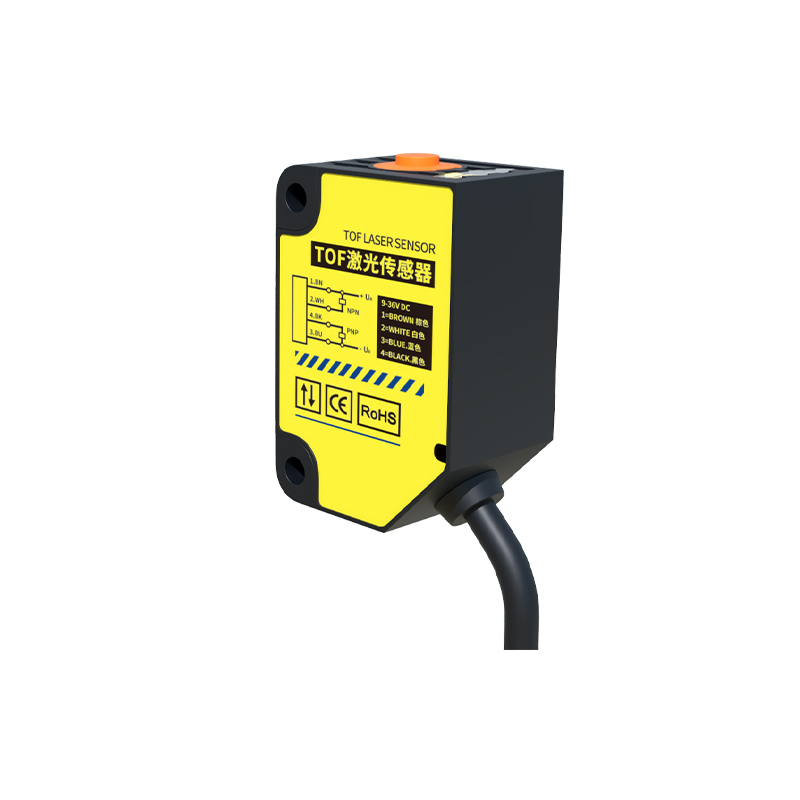
For standard conveyor detection, see our general-purpose photoelectric sensor options or browse the full photoelectric sensor range.
3. Check the electrical interface before wiring
Most industrial sensors use 10–30 V DC or 12–24 V DC supplies, but the actual range must be verified on the model label or datasheet. A common three-wire color convention is brown for positive supply, blue for 0 V and black for the switching output; do not rely on color alone.
Match a PNP sensor to a PLC input configured for sourcing logic and an NPN sensor to a compatible sinking input.
Confirm the PLC input common connection and ensure the sensor output current does not exceed its rating.
Route sensor cables away from motor and variable-frequency-drive power cables. Use appropriate shielding and grounding when electrical noise is present.
Do not use a standard photoelectric sensor as a personnel-safety device. Safety functions require approved safety-rated components and a validated safety circuit.
4. Use simple PLC logic
Map the sensor to a named input such as PE_Infeed. Then separate raw input, filtered detection and machine action in the program. A typical sequence is:
Read the raw sensor input.
Apply a short on-delay or input filter only when needed to reject brief noise. The filter must remain shorter than the minimum time a target is visible.
Create a rising-edge pulse for counting or one-time actions.
Use interlocks for conveyor run status, downstream availability and fault conditions.
Trigger a jam alarm when a sensor remains blocked longer than the application permits.
Detected := PE_Infeed AND Conveyor_Run;
Count_Pulse := RisingEdge(Detected);
Jam_Alarm := Detected AND Jam_Timer_Done;
The exact instructions differ between PLC platforms. Treat this pseudocode as a sequence description, not a program ready to download.
5. Verify timing
Estimate how long the target remains in the sensing beam:
Detection time = target length in the travel direction ÷ conveyor speed
The sensor response time, PLC input filter and scan time must together be comfortably shorter than this detection time. If the product is small or the belt is fast, verify the calculation with the actual hardware instead of increasing the software filter until the signal appears stable.
6. Commission with actual products
Lock out hazardous motion before mounting or rewiring equipment.
Align the sensor and set sensitivity according to the product manual.
Test the smallest, darkest, brightest, most reflective and most transparent targets expected in production.
Run tests at minimum and maximum conveyor speed and at the edges of the sensing zone.
Check behavior after vibration, dust buildup and changes in ambient light.
Record the model, wiring, settings, mounting distance and PLC address for maintenance.
Common faults
| Symptom | Checks |
|---|---|
| No PLC input | Supply voltage, output type, input common, connector pinout and sensor indicator. |
| Intermittent detection | Alignment, vibration, target variation, cable routing, response time and excessive input filtering. |
| False triggers | Background reflections, ambient light, electrical noise, dust, water droplets and sensitivity setting. |
| Double counts | Product shape, bouncing packages, multiple reflective surfaces and edge-detection logic. |
Need help selecting a sensor?
Send the target material and size, sensing distance, conveyor speed, supply voltage, required output type and environmental conditions through our contact and RFQ page. We can then narrow the sensing method and model options for your application.
Photoelectric sensors are widely used on conveyors to detect products without physical contact. Reliable results depend on more than the PLC program: the sensing method, target material, mounting position, output type, response time and environment must all be matched to the application.
This guide explains a practical setup for object presence, counting or transfer-point control. Always confirm the final wiring and ratings in the sensor and PLC manuals before commissioning.
1. Define the detection task
Record the following before selecting a sensor:
Target: size, shape, color, surface finish, transparency and minimum gap between objects.
Geometry: available mounting space, sensing distance and possible background reflections.
Line conditions: conveyor speed, vibration, dust, washdown, ambient light and temperature.
Control requirement: presence detection, edge detection, counting, position confirmation or jam monitoring.
Electrical interface: supply voltage, PNP or NPN input, normally open or normally closed logic, connector type and required response time.
2. Select the sensing method
| Method | Typical use | Main checks |
|---|---|---|
| Through-beam | Longer range and reliable detection of opaque targets | Requires an emitter and receiver on opposite sides; check alignment and wiring on both sides. |
| Retro-reflective | Single-side wiring with a reflector | Glossy or transparent targets may need polarized optics or a model designed for clear-object detection. |
| Diffuse reflective | Short-range detection when access is available from one side only | Detection distance can vary with target color, finish and background; test the actual product. |
| Background suppression | Targets with a nearby or changing background | Confirm the specified sensing range and minimum target size. |
For standard conveyor detection, see our general-purpose photoelectric sensor options or browse the full photoelectric sensor range.
3. Check the electrical interface before wiring
Most industrial sensors use 10–30 V DC or 12–24 V DC supplies, but the actual range must be verified on the model label or datasheet. A common three-wire color convention is brown for positive supply, blue for 0 V and black for the switching output; do not rely on color alone.
Match a PNP sensor to a PLC input configured for sourcing logic and an NPN sensor to a compatible sinking input.
Confirm the PLC input common connection and ensure the sensor output current does not exceed its rating.
Route sensor cables away from motor and variable-frequency-drive power cables. Use appropriate shielding and grounding when electrical noise is present.
Do not use a standard photoelectric sensor as a personnel-safety device. Safety functions require approved safety-rated components and a validated safety circuit.
4. Use simple PLC logic
Map the sensor to a named input such as PE_Infeed. Then separate raw input, filtered detection and machine action in the program. A typical sequence is:
Read the raw sensor input.
Apply a short on-delay or input filter only when needed to reject brief noise. The filter must remain shorter than the minimum time a target is visible.
Create a rising-edge pulse for counting or one-time actions.
Use interlocks for conveyor run status, downstream availability and fault conditions.
Trigger a jam alarm when a sensor remains blocked longer than the application permits.
Detected := PE_Infeed AND Conveyor_Run;
Count_Pulse := RisingEdge(Detected);
Jam_Alarm := Detected AND Jam_Timer_Done;
The exact instructions differ between PLC platforms. Treat this pseudocode as a sequence description, not a program ready to download.
5. Verify timing
Estimate how long the target remains in the sensing beam:
Detection time = target length in the travel direction ÷ conveyor speed
The sensor response time, PLC input filter and scan time must together be comfortably shorter than this detection time. If the product is small or the belt is fast, verify the calculation with the actual hardware instead of increasing the software filter until the signal appears stable.
6. Commission with actual products
Lock out hazardous motion before mounting or rewiring equipment.
Align the sensor and set sensitivity according to the product manual.
Test the smallest, darkest, brightest, most reflective and most transparent targets expected in production.
Run tests at minimum and maximum conveyor speed and at the edges of the sensing zone.
Check behavior after vibration, dust buildup and changes in ambient light.
Record the model, wiring, settings, mounting distance and PLC address for maintenance.
Common faults
| Symptom | Checks |
|---|---|
| No PLC input | Supply voltage, output type, input common, connector pinout and sensor indicator. |
| Intermittent detection | Alignment, vibration, target variation, cable routing, response time and excessive input filtering. |
| False triggers | Background reflections, ambient light, electrical noise, dust, water droplets and sensitivity setting. |
| Double counts | Product shape, bouncing packages, multiple reflective surfaces and edge-detection logic. |
Need help selecting a sensor?
Send the target material and size, sensing distance, conveyor speed, supply voltage, required output type and environmental conditions through our contact and RFQ page. We can then narrow the sensing method and model options for your application.
Photoelectric sensors are widely used on conveyors to detect products without physical contact. Reliable results depend on more than the PLC program: the sensing method, target material, mounting position, output type, response time and environment must all be matched to the application.
This guide explains a practical setup for object presence, counting or transfer-point control. Always confirm the final wiring and ratings in the sensor and PLC manuals before commissioning.
1. Define the detection task
Record the following before selecting a sensor:
Target: size, shape, color, surface finish, transparency and minimum gap between objects.
Geometry: available mounting space, sensing distance and possible background reflections.
Line conditions: conveyor speed, vibration, dust, washdown, ambient light and temperature.
Control requirement: presence detection, edge detection, counting, position confirmation or jam monitoring.
Electrical interface: supply voltage, PNP or NPN input, normally open or normally closed logic, connector type and required response time.
2. Select the sensing method
| Method | Typical use | Main checks |
|---|---|---|
| Through-beam | Longer range and reliable detection of opaque targets | Requires an emitter and receiver on opposite sides; check alignment and wiring on both sides. |
| Retro-reflective | Single-side wiring with a reflector | Glossy or transparent targets may need polarized optics or a model designed for clear-object detection. |
| Diffuse reflective | Short-range detection when access is available from one side only | Detection distance can vary with target color, finish and background; test the actual product. |
| Background suppression | Targets with a nearby or changing background | Confirm the specified sensing range and minimum target size. |
For standard conveyor detection, see our general-purpose photoelectric sensor options or browse the full photoelectric sensor range.
3. Check the electrical interface before wiring
Most industrial sensors use 10–30 V DC or 12–24 V DC supplies, but the actual range must be verified on the model label or datasheet. A common three-wire color convention is brown for positive supply, blue for 0 V and black for the switching output; do not rely on color alone.
Match a PNP sensor to a PLC input configured for sourcing logic and an NPN sensor to a compatible sinking input.
Confirm the PLC input common connection and ensure the sensor output current does not exceed its rating.
Route sensor cables away from motor and variable-frequency-drive power cables. Use appropriate shielding and grounding when electrical noise is present.
Do not use a standard photoelectric sensor as a personnel-safety device. Safety functions require approved safety-rated components and a validated safety circuit.
4. Use simple PLC logic
Map the sensor to a named input such as PE_Infeed. Then separate raw input, filtered detection and machine action in the program. A typical sequence is:
Read the raw sensor input.
Apply a short on-delay or input filter only when needed to reject brief noise. The filter must remain shorter than the minimum time a target is visible.
Create a rising-edge pulse for counting or one-time actions.
Use interlocks for conveyor run status, downstream availability and fault conditions.
Trigger a jam alarm when a sensor remains blocked longer than the application permits.
Detected := PE_Infeed AND Conveyor_Run;
Count_Pulse := RisingEdge(Detected);
Jam_Alarm := Detected AND Jam_Timer_Done;
The exact instructions differ between PLC platforms. Treat this pseudocode as a sequence description, not a program ready to download.
5. Verify timing
Estimate how long the target remains in the sensing beam:
Detection time = target length in the travel direction ÷ conveyor speed
The sensor response time, PLC input filter and scan time must together be comfortably shorter than this detection time. If the product is small or the belt is fast, verify the calculation with the actual hardware instead of increasing the software filter until the signal appears stable.
6. Commission with actual products
Lock out hazardous motion before mounting or rewiring equipment.
Align the sensor and set sensitivity according to the product manual.
Test the smallest, darkest, brightest, most reflective and most transparent targets expected in production.
Run tests at minimum and maximum conveyor speed and at the edges of the sensing zone.
Check behavior after vibration, dust buildup and changes in ambient light.
Record the model, wiring, settings, mounting distance and PLC address for maintenance.
Common faults
| Symptom | Checks |
|---|---|
| No PLC input | Supply voltage, output type, input common, connector pinout and sensor indicator. |
| Intermittent detection | Alignment, vibration, target variation, cable routing, response time and excessive input filtering. |
| False triggers | Background reflections, ambient light, electrical noise, dust, water droplets and sensitivity setting. |
| Double counts | Product shape, bouncing packages, multiple reflective surfaces and edge-detection logic. |
Need help selecting a sensor?
Send the target material and size, sensing distance, conveyor speed, supply voltage, required output type and environmental conditions through our contact and RFQ page. We can then narrow the sensing method and model options for your application.
Photoelectric sensors are widely used on conveyors to detect products without physical contact. Reliable results depend on more than the PLC program: the sensing method, target material, mounting position, output type, response time and environment must all be matched to the application.
This guide explains a practical setup for object presence, counting or transfer-point control. Always confirm the final wiring and ratings in the sensor and PLC manuals before commissioning.
1. Define the detection task
Record the following before selecting a sensor:
Target: size, shape, color, surface finish, transparency and minimum gap between objects.
Geometry: available mounting space, sensing distance and possible background reflections.
Line conditions: conveyor speed, vibration, dust, washdown, ambient light and temperature.
Control requirement: presence detection, edge detection, counting, position confirmation or jam monitoring.
Electrical interface: supply voltage, PNP or NPN input, normally open or normally closed logic, connector type and required response time.
2. Select the sensing method
| Method | Typical use | Main checks |
|---|---|---|
| Through-beam | Longer range and reliable detection of opaque targets | Requires an emitter and receiver on opposite sides; check alignment and wiring on both sides. |
| Retro-reflective | Single-side wiring with a reflector | Glossy or transparent targets may need polarized optics or a model designed for clear-object detection. |
| Diffuse reflective | Short-range detection when access is available from one side only | Detection distance can vary with target color, finish and background; test the actual product. |
| Background suppression | Targets with a nearby or changing background | Confirm the specified sensing range and minimum target size. |
For standard conveyor detection, see our general-purpose photoelectric sensor options or browse the full photoelectric sensor range.
3. Check the electrical interface before wiring
Most industrial sensors use 10–30 V DC or 12–24 V DC supplies, but the actual range must be verified on the model label or datasheet. A common three-wire color convention is brown for positive supply, blue for 0 V and black for the switching output; do not rely on color alone.
Match a PNP sensor to a PLC input configured for sourcing logic and an NPN sensor to a compatible sinking input.
Confirm the PLC input common connection and ensure the sensor output current does not exceed its rating.
Route sensor cables away from motor and variable-frequency-drive power cables. Use appropriate shielding and grounding when electrical noise is present.
Do not use a standard photoelectric sensor as a personnel-safety device. Safety functions require approved safety-rated components and a validated safety circuit.
4. Use simple PLC logic
Map the sensor to a named input such as PE_Infeed. Then separate raw input, filtered detection and machine action in the program. A typical sequence is:
Read the raw sensor input.
Apply a short on-delay or input filter only when needed to reject brief noise. The filter must remain shorter than the minimum time a target is visible.
Create a rising-edge pulse for counting or one-time actions.
Use interlocks for conveyor run status, downstream availability and fault conditions.
Trigger a jam alarm when a sensor remains blocked longer than the application permits.
Detected := PE_Infeed AND Conveyor_Run;
Count_Pulse := RisingEdge(Detected);
Jam_Alarm := Detected AND Jam_Timer_Done;
The exact instructions differ between PLC platforms. Treat this pseudocode as a sequence description, not a program ready to download.
5. Verify timing
Estimate how long the target remains in the sensing beam:
Detection time = target length in the travel direction ÷ conveyor speed
The sensor response time, PLC input filter and scan time must together be comfortably shorter than this detection time. If the product is small or the belt is fast, verify the calculation with the actual hardware instead of increasing the software filter until the signal appears stable.
6. Commission with actual products
Lock out hazardous motion before mounting or rewiring equipment.
Align the sensor and set sensitivity according to the product manual.
Test the smallest, darkest, brightest, most reflective and most transparent targets expected in production.
Run tests at minimum and maximum conveyor speed and at the edges of the sensing zone.
Check behavior after vibration, dust buildup and changes in ambient light.
Record the model, wiring, settings, mounting distance and PLC address for maintenance.
Common faults
| Symptom | Checks |
|---|---|
| No PLC input | Supply voltage, output type, input common, connector pinout and sensor indicator. |
| Intermittent detection | Alignment, vibration, target variation, cable routing, response time and excessive input filtering. |
| False triggers | Background reflections, ambient light, electrical noise, dust, water droplets and sensitivity setting. |
| Double counts | Product shape, bouncing packages, multiple reflective surfaces and edge-detection logic. |
Need help selecting a sensor?
Send the target material and size, sensing distance, conveyor speed, supply voltage, required output type and environmental conditions through our contact and RFQ page. We can then narrow the sensing method and model options for your application.