2026-06-06
Tech Hub
By 创始人
Integrating Photoelectric Sensors with Microcontrollers: A Practical Guide for Electrical Engineers
Understanding the Photoelectric Sensor Interface
Photoelectric sensors are widely used in industrial automation for object detection, counting, and positioning. These sensors typically output a digital signal (e.g., NPN or PNP) or an analog voltage/current signal. For microcontroller integration, the most common interface is the digital output, which can be directly connected to a GPIO pin. However, the engineer must consider voltage levels: many sensors operate at 12-24V DC, while microcontrollers typically use 3.3V or 5V logic. Using a voltage divider, optocoupler, or level shifter is essential to avoid damaging the MCU. For example, a 24V NPN sensor can be interfaced via a resistor divider to drop the voltage to 5V, or an optocoupler can provide galvanic isolation.
Hardware Setup and Signal Conditioning
When connecting a photoelectric sensor to a microcontroller like an Arduino, STM32, or PIC, start by verifying the sensor's output type. For a PNP (source) sensor, connect the output to the MCU pin through a pull-down resistor (e.g., 10kΩ) to ensure a defined low state when the sensor is inactive. For an NPN (sink) sensor, use a pull-up resistor to VCC. If the sensor provides an analog signal (e.g., 0-10V or 4-20mA), a voltage divider or a current-to-voltage converter circuit is required. Additionally, consider debouncing: add a small capacitor (e.g., 100nF) across the sensor output and ground to filter noise. Always include a series resistor (e.g., 220Ω) to limit current into the MCU pin.
Firmware Implementation and Timing
The microcontroller firmware must poll the sensor input or use an external interrupt for real-time detection. For digital sensors, configure the GPIO as input with internal pull-up or pull-down resistors if supported. Use a simple loop to read the pin state: if active, trigger a response, such as incrementing a counter or activating an actuator. For analog sensors, use the MCU's ADC module and sample at a rate fast enough for the application (e.g., 100 Hz for slow-moving objects). Implement a state machine to handle edge detection: for example, detect rising or falling edges using previous state comparison. Ensure timing is stable by using timer interrupts rather than blocking delays.
Practical Example: Object Counting with an Arduino
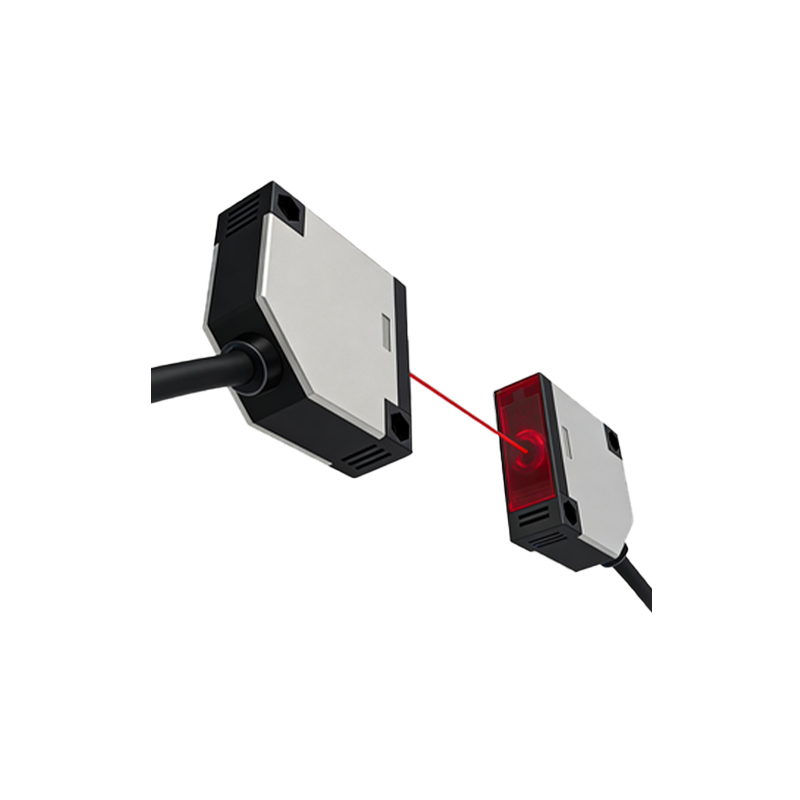
Consider a through-beam photoelectric sensor with a PNP output. Connect the sensor's brown wire to 24V, blue to GND, and black output to a voltage divider (e.g., 10kΩ to GND and 20kΩ to output) to produce a 5V signal at the MCU pin. On an Arduino Uno, wire the divided output to digital pin 2. In code, use an interrupt on pin 2 (CHANGE mode) to count objects:
attachInterrupt(digitalPinToInterrupt(2), countObject, CHANGE);. The ISR increments a volatile counter. For debouncing, add a 10ms delay in the ISR via
millis() comparison. Test with a moving conveyor belt; the count should be accurate up to 100 Hz without jitter.
Common Pitfalls and Troubleshooting Tips
Electrical engineers often face issues like false triggering or signal latency. False triggers can result from electrical noise: use twisted-pair shielded cable for the sensor connection and place a ferrite bead near the MCU. If the sensor output is inverted, check the sensor's datasheet for light-on or dark-on modes. For analog sensors, ensure the ADC reference voltage matches the sensor's output range. Using a multimeter to verify the sensor output voltage at the MCU pin is crucial. Additionally, avoid floating inputs by always using pull resistors. If the MCU resets unexpectedly, check for voltage spikes; add a TVS diode at the power input.
Advanced Integration: Multiple Sensors and Communication
For systems with multiple photoelectric sensors, the MCU must handle concurrent inputs. Use a multiplexer (e.g., 74HC4051) to expand GPIOs or employ I2C/SPI ADC converters for analog inputs. For industrial environments, consider a CAN bus interface to connect sensors to the MCU over longer distances. Implement a priority-based interrupt system to ensure critical sensors are served first. Firmware should include a watchdog timer to recover from errors. Data logging can be achieved via UART to a PC or SD card. Finally, always validate the system under real operating conditions, including temperature and humidity extremes, to ensure reliability.