Understanding the Basics of Photoelectric Sensor Door Locks
Photoelectric sensor door locks are critical components in modern access control systems, industrial automation, and safety applications. These locks rely on a pair of emitter and receiver units to detect the presence or absence of an object (e.g., a door panel or a person). The sensor works by emitting a light beam (infrared, visible, or laser) from the emitter to the receiver. When the beam is interrupted, the lock mechanism triggers or releases. To correctly install and troubleshoot these devices, you must be able to read and understand the accompanying wiring and schematic diagrams. The diagrams typically include symbols for power supply, control relays, lock solenoids, and sensor alignment. Pay close attention to the voltage ratings (e.g., 12V DC or 24V AC) and the polarity markings on the sensor terminals—reversing polarity can damage the unit. Always verify the diagram against the manufacturer\'s datasheet, as pin assignments vary between brands.

Key Components in the Diagram
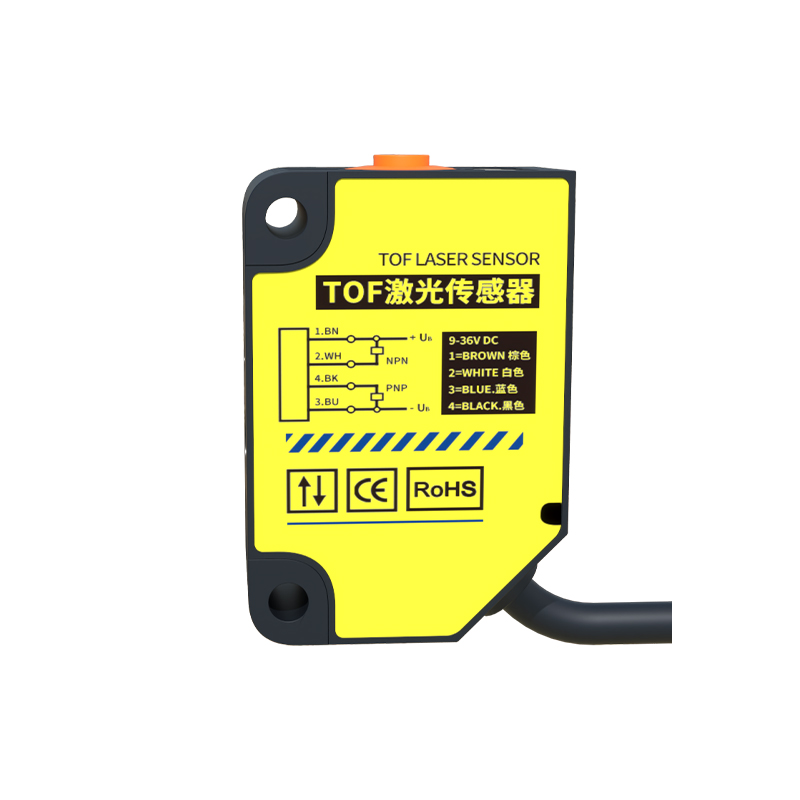
A standard photoelectric sensor door lock diagram consists of several distinct blocks. The first is the power input section, often labeled V+ and V-, with a recommended fuse or circuit breaker for protection. Next is the sensor module, which includes the emitter (E) and receiver (R) symbols, sometimes with an arrow indicating the beam path. The output of the receiver is typically a transistor (NPN or PNP) or a relay contact, shown as a switch symbol. This output connects to the door lock solenoid or a magnet. In many diagrams, a timer or delay circuit is included to hold the lock open for a set duration after the beam is broken. You will also see status indicators (LEDs) for power and signal, often drawn as small circles with letters like P (power) or S (signal). Understanding these symbols is crucial for both installation and diagnostics—for instance, if the lock fails to release, you can check the output relay coil continuity.
Reading the Wiring and Connection Diagram
The wiring diagram is the most practical part for field engineers. It shows the physical connections between terminals. Typically, the diagram uses a numbered terminal block (e.g., TB1:1 to TB1:8). For example, terminal 1 and 2 are for AC or DC power input. Terminal 3 and 4 are for the sensor output (normally open or normally closed). Terminal 5 and 6 are for the lock solenoid, which may be a separate power source. Some diagrams include a dashed line to indicate a shielded cable for the sensor to prevent electromagnetic interference (EMI). When reading the diagram, note the wire colors: red (V+), black (V-), blue (output signal), and yellow (shield drain). Use a multimeter to verify continuity during installation—if the sensor output is normally closed, the circuit should be complete when the beam is unbroken. Always refer to the legend or key provided in the diagram, as conventions differ between manufacturers.
Troubleshooting Common Issues Using the Diagram
One of the primary reasons engineers need to read these diagrams is for troubleshooting. If the door lock remains engaged or disengaged incorrectly, start by checking the power supply terminals (V+ and V-) for correct voltage. Then, test the sensor output: with the beam uninterrupted, the output should be in its normal state (e.g., NC = short circuit). Use the diagram to identify test points. For instance, if the lock solenoid is not receiving power, trace the circuit from the sensor output to the relay coil. A common fault is misalignment of the emitter and receiver, which can be verified by looking at the alignment indicator on the diagram (often a small LED symbol). Also, examine the diagram for any fuse or resettable fuse (PTC) symbols—blown fuses are a frequent cause of lock failures. If the diagram shows a pull-up resistor, ensure it is installed correctly to avoid false triggers. For advanced issues, such as oscillation in the beam, check the diagram for adjustable sensitivity potentiometers (drawn as a triangle with a line).
Safety and Best Practices for Installation
When working with photoelectric sensor door locks, the diagram is your roadmap to safe installation. First, always disconnect power before making connections—the diagram will typically show a warning symbol (exclamation mark). Use the diagram to identify proper grounding points, especially in environments with high static or dust. For outdoor installations, check for ingress protection (IP) ratings referenced in the diagram. The sensor alignment is critical: ensure the emitter and receiver are directly facing each other within the specified distance (often indicated in the diagram as a range, e.g., 0.5m to 10m). Additionally, avoid obstructions in the beam path, such as labels or cables, which can be verified by the beam path arrow in the diagram. After installation, test the lock in both normal and fail-safe modes as per the diagram—some locks are designed to unlock on power loss (fail-safe) or lock on power loss (fail-secure). Document your changes on the diagram for future maintenance.